IPTV on a Mac: The Clean UK Setup for Live TV
A plain spoken guide to licensed IPTV on a Mac: the Safari DRM advantage, the Apple TV app, picture in picture and AirPlay out to the living room TV.

Contents
- What IPTV on Mac Actually Covers
- Safari or Chrome: The DRM Decision
- The Apple TV App and the Short List of Mac Streaming Apps
- Picture in Picture: Keep a Channel in the Corner
- AirPlay: Out to the Proper Telly at Night
- The Clean Setup, Step by Step
- When a Mac stream stutters or refuses to play
- Verdict: One Browser Habit Covers Almost Everything
A Mac makes a quietly excellent telly. The screen is sharp, the speakers beat most laptops, and every licensed UK streaming service runs on it without an aerial or a set top box. The trouble is that most advice about IPTV on Mac points you at playlist player apps and subscription sellers, which is the fastest route to unlicensed streams and dead logins. This guide takes the clean route instead: the right browser for each service, the built in Apple TV app, picture in picture for the working day, and AirPlay for the evening.
What IPTV on Mac Actually Covers
Strip away the jargon and IPTV simply means television delivered over your broadband instead of through an aerial or a dish. On a Mac, that covers a lot of ground. BBC iPlayer, ITVX, Channel 4 and 5 handle the main broadcasters. Now carries the Sky channels without a Sky box, and discovery+ carries TNT Sports for the football. Netflix, Prime Video, Pluto TV, Samsung TV Plus on the web and The Roku Channel fill in the rest, from box sets to free ad supported live channels. Every one of those services is licensed. Every one of them runs in a browser or a native app, with nothing to sideload or configure.
There is a second meaning of IPTV, and it is the one to swerve. Search the Mac App Store for the term and you get rows of player shells: tidy looking apps that do nothing until you paste in an M3U playlist URL from somewhere else. The apps themselves are legitimate software. The playlists sold to feed them, usually pitched around £10-15 a month for “every channel in the world” (checked July 2026, seller prices vary constantly), are almost never licensed to show any of it. Streams die on big match days. Everything below runs through a browser or an official app you already trust, so there is nothing extra to set up or maintain.
Safari or Chrome: The DRM Decision
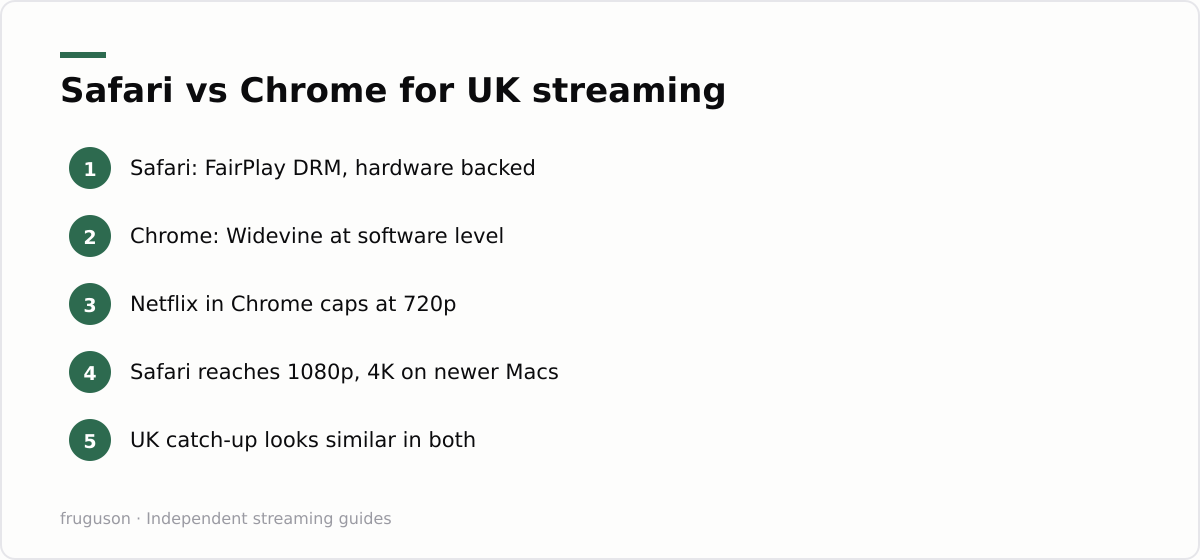
Every mainstream service wraps its streams in DRM, and the two big Mac browsers speak different dialects of it. Safari uses FairPlay, Apple’s own system, wired into macOS and backed by the hardware on Apple silicon machines. Chrome uses Widevine, which on desktop runs at a software security level rather than a hardware one. Each service decides how much picture quality to hand each security level, and several of them treat software Widevine with open suspicion.
Netflix is the clearest example. Played in Safari on a reasonably recent Mac it can reach 1080p, and 4K on supported hardware with the Premium plan. Played in Chrome it has long been capped at 720p, which looks noticeably soft on a Retina display. Prime Video behaves in a similar way, saving its best desktop quality for Safari. The UK catch-up services are far less fussy. BBC iPlayer streams happily from https://www.bbc.co.uk/iplayer in either browser, and the free broadcaster apps look much the same wherever you open them.
| Service | Best choice on a Mac | Why |
|---|---|---|
| Netflix | Safari | FairPlay allows 1080p and 4K; Chrome sits at 720p |
| Prime Video | Safari or the Mac app | Better picture, and the app adds downloads |
| BBC iPlayer | Either browser | No meaningful quality gap |
| Now | Safari | Browser only service; Safari is the dependable default |
| ITVX, Channel 4, 5 | Either browser | Free ad supported streams, similar in both |
The practical rule is short. Keep Safari as the default for anything with a subscription behind it, and hold Chrome in reserve for the odd site that misbehaves after an update. If you want a fuller picture of which UK services stream well with no app at all, our guide to watching IPTV in a browser walks through each service one by one.
The Apple TV App and the Short List of Mac Streaming Apps
Your Mac ships with one proper streaming app already installed. The Apple TV app covers Apple TV+ originals plus any films you rent or buy through Apple, and it is the one place on the platform where offline downloads are guaranteed to work. Grab a couple of episodes before a train journey and they play back without a whisper of Wi-Fi. Quality is excellent, since the app is not subject to browser DRM limits at all.
Beyond that, the honest list of Mac streaming apps is short. Amazon publishes a Prime Video app for macOS with proper downloads, which makes it the obvious pick for frequent flyers. Netflix has never released a Mac app, so it is browser only and offline viewing is off the menu entirely. The BBC retired its desktop downloads programme some years back, which means iPlayer downloads now live on phones and tablets rather than on your computer. ITVX and the other broadcaster services tell the same story: stream in the browser, download on mobile where the service allows it at all.
None of this hurts much for home viewing, because the browser carries the load. It matters mainly if you travel, and that gap is worth knowing before you assume IPTV on Mac works exactly like IPTV on an iPad. For the television side of the same question, our roundup of the best IPTV apps in the UK covers what belongs on a proper telly rather than a laptop.
Picture in Picture: Keep a Channel in the Corner
This is the feature that turns a work machine into a telly without sacrificing the work. Start a live stream in Safari, then click the small audio icon that appears in the tab and choose the picture in picture option. You can also right click the video twice to reach the real context menu, then pick Enter Picture in Picture from there. The stream pops out into a floating window that stays above every other application, so your channel keeps playing on top of whatever you are actually meant to be doing.
Drag the window to any corner and it snaps neatly into place. Resize it by pulling an edge. Hold Command while dragging if you want it parked somewhere other than a corner. The window survives switching between desktop Spaces too, which makes it far more useful than a normal browser window shoved to one side.
Parked in the corner, a Safari live TV window is the cheapest second screen you will ever set up. Rolling news during a slow afternoon, the cricket on a Friday, an Olympic final while you pretend to answer email: all of it sits quietly in 300 pixels of screen. Chrome manages the same trick through the media control icon in its toolbar, though Safari’s version feels more at home on macOS. If you mostly watch TV on Mac hardware rather than on a television, this single feature justifies the whole setup.

AirPlay: Out to the Proper Telly at Night
Sooner or later the sofa wins, and AirPlay is the clean handover from laptop to living room. Two methods exist and the difference genuinely matters. Screen mirroring, started from Control Centre, clones your whole desktop to the TV; DRM protected video often refuses to play this way and shows a black rectangle where the film should be. The AirPlay button inside a video player is the better route. Click it and the Mac hands the stream itself over to the television, which then pulls the video directly at full quality while your laptop stays free for other things.
You need a receiver on the other end: an Apple TV box, or a recent smart TV with AirPlay 2 built in, which covers most mid range sets sold in the past few years. If your living room already runs on Apple’s box, our guide to IPTV on Apple TV 4K covers the channel apps worth installing there, so everyday viewing never needs AirPlay in the first place.
The Clean Setup, Step by Step
Here is the whole routine in order. It takes perhaps twenty minutes, most of which is typing passwords.
- Update macOS. DRM playback and AirPlay both improve with system updates, and 4K Netflix in Safari depends on a reasonably current version.
- Make Safari the streaming browser. Sign in to each service you pay for and let it remember the logins. Chrome stays installed purely as a fallback.
- Sign in to the Apple TV app. It is preinstalled on every Mac. Check the download quality setting if you plan to take episodes offline.
- Install the Prime Video app from the Mac App Store if you subscribe and ever watch away from Wi-Fi.
- Learn the picture in picture click. Tab audio icon, then the pop out option. Practise once so it becomes muscle memory.
- Test AirPlay from a video player’s own AirPlay button rather than screen mirroring, so protected content actually plays.
- Learn the quick fixes. If a stream stutters, keep the Mac plugged in, close spare tabs, and confirm your connection with a fast speed test before blaming the service.
When a Mac stream stutters or refuses to play
Most playback trouble on a Mac has a quick fix. If a live channel keeps buffering, start with the connection: run a speed test, and if the Mac is on Wi-Fi at the far end of the house, move closer to the router or plug in over ethernet with a USB-C adapter. A stream that stutters only on battery is usually macOS throttling itself, so keep the machine plugged in or switch off Low Power Mode in System Settings under Battery. When one service alone plays up, clear that site’s cache or open it in a fresh private window, since a stale login token or cookie is a common culprit. A black rectangle where the video should be almost always means a DRM handshake failed: reach for Safari rather than Chrome, since FairPlay is wired into macOS and rarely trips up. Finally, quit the browser fully and reopen it; a Mac left asleep for days builds up memory pressure that a restart clears in seconds.
Verdict: One Browser Habit Covers Almost Everything
Setting up IPTV on Mac properly comes down to a single habit: play subscription video in Safari, keep everything signed in, and let picture in picture handle the working day. FairPlay buys you the resolution Chrome throws away. The Apple TV and Prime Video apps add offline viewing for travel, and AirPlay bridges to the big screen once the film deserves it. No playlist seller gets a penny, no sketchy player shell gets installed, and every stream you start will still be there next month. Should your viewing keep drifting to the television anyway, treat that as the signal to put a dedicated streaming box under it and let the Mac go back to being a computer.
Frequently asked questions
Is Safari really better than Chrome for streaming on a Mac?
For subscription services, yes. Safari uses Apple's FairPlay DRM, which services trust with higher resolutions, so Netflix can reach 1080p or 4K there while Chrome is held at 720p. UK catch-up services such as BBC iPlayer look much the same in either browser.
Why does a live stream stutter more when my MacBook is unplugged?
macOS throttles performance on battery, and Low Power Mode in particular can make video drop frames or buffer. Plug the Mac in for anything live, or turn Low Power Mode off in System Settings under Battery. Closing heavy background apps and spare browser tabs frees up memory and helps too.
Can I download shows for offline viewing on a Mac?
Only where a native app exists. The built in Apple TV app and the Prime Video app for macOS both offer proper downloads. Netflix is browser only on the Mac, and the BBC retired its desktop downloads programme, so iPlayer offline viewing is limited to phones and tablets.
Summarize this post with:
Follow How To Watch Streaming on Google News so you never miss a new guide.




Leave a comment