How Does IPTV Work? Streams, Servers and Your TV
Plain-English guide to the journey behind internet TV: encoding, CDN servers, adaptive bitrate, buffering and why streams lag broadcast.
Contents
- First stop: turning pictures into data
- How does IPTV work at the server end?
- Adaptive bitrate: why picture quality shifts mid-programme
- Why buffering happens
- The goal next door: latency explained
- What broadband speed do you actually need?
- IPTV technology is neutral, the sellers often are not
- Put the knowledge to work
Press play on a football match and a picture appears within a couple of seconds. It feels like magic. Underneath sits a chain of encoders, servers and cables that would have baffled a broadcast engineer thirty years ago. If you have ever wondered how does IPTV work, here is the short version: the camera feed gets compressed into data and cut into small chunks. Servers around the country hold copies. The player inside your telly fetches those chunks and stitches them back into moving pictures. No aerial. No dish. Your broadband line does the lot.
This guide walks the whole journey in plain English, from the studio encoder to the buffering wheel, and answers the question every streamer asks eventually: why does next door cheer a goal before you see it?
First stop: turning pictures into data
A live camera feed is enormous. Uncompressed HD video runs to more than a gigabit per second, far beyond what any home broadband line can carry. Compression is therefore the first job of any system delivering live TV over the internet. An encoder takes the raw feed and squeezes it with a codec, usually H.264 or its newer sibling HEVC, discarding detail your eye will not miss. A typical HD channel emerges at somewhere between 3 and 8 megabits per second. That is a reduction of over 99 percent, performed live, in a rack of hardware at the broadcaster’s end.
Compression alone is not the whole story. The stream is then sliced into short segments, usually between two and six seconds long. Your player downloads these chunks one after another rather than drinking from one continuous pipe. Chunking sounds like a minor detail. It is actually the foundation of nearly all modern internet television, because it lets ordinary web servers deliver video the same way they deliver web pages. The two video streaming protocols you will meet most often are HLS, created by Apple, and MPEG DASH, an open standard. Both publish a small menu file telling the player which chunks exist and where to fetch them, with a version of that menu for each quality level on offer.

How does IPTV work at the server end?
One server in London could never feed millions of simultaneous viewers. The maths falls over instantly: a single HD stream at 5 megabits per second, multiplied by a million viewers, is five terabits per second pouring out of one building. So broadcasters lean on content delivery networks, or CDNs. A CDN copies each fresh chunk to hundreds of cache servers spread across the country and beyond, the moment the chunk exists. When your telly requests the next segment, a machine perhaps a few miles away answers, rather than the origin server itself. Shorter distances make delivery faster and steadier, and the origin only has to feed the caches, never the whole audience.
There is one more wrinkle worth a light paragraph. Streaming apps such as BBC iPlayer or ITVX use unicast, meaning every viewer receives their own private copy of the stream. Old-school telco television, the kind BT once piped over its own network, used multicast instead: one stream travels down the line and is duplicated only at the final junction. Multicast is vastly more efficient, but it only works when a single company controls the pipes from end to end. Nearly everything you watch through an app today is unicast, which is precisely why enormous live events put CDNs under genuine strain.
Adaptive bitrate: why picture quality shifts mid-programme
Ever noticed the picture soften for a few seconds, then sharpen again? That is adaptive bitrate at work, and it is deliberate. The encoder does not produce one version of a channel. It produces a ladder of them, perhaps six renditions of the same feed, from a grainy few hundred kilobits per second right up to full 4K. Your player constantly measures how quickly chunks arrive. When the connection slows, perhaps because someone upstairs started a cloud backup, the player quietly steps down a rung and requests smaller chunks. When conditions improve it climbs back up again.
Softer picture beats frozen picture. That is the entire philosophy. A stream that stalls loses viewers within seconds; a stream that briefly drops to 720p mostly goes unnoticed from the sofa. If your picture sits permanently at the blurry end of the ladder, though, treat that as a sign your connection or Wi-Fi needs attention rather than as a fault in the service itself.
Why buffering happens
The player keeps a small reserve of downloaded video, typically a handful of seconds, so brief network hiccups pass unseen. Buffering is what happens when that reserve runs dry. Chunks are arriving more slowly than you are watching them, the cupboard empties, and playback stops until enough video has been stockpiled to continue safely.
Most of the causes are mundane. Weak Wi-Fi is the biggest offender in British homes, especially through thick brick walls. Evening congestion plays a part too, as can an overloaded CDN during a huge live event, when millions of unicast streams hit the caches at once. The fix list is equally unglamorous. Move the router somewhere sensible. Run an ethernet cable to the main telly where possible. Check what else in the house is quietly eating bandwidth. Our IPTV equipment guide covers the kit side of this, including which streaming boxes and Wi-Fi setups cope most gracefully with imperfect connections.
The goal next door: latency explained
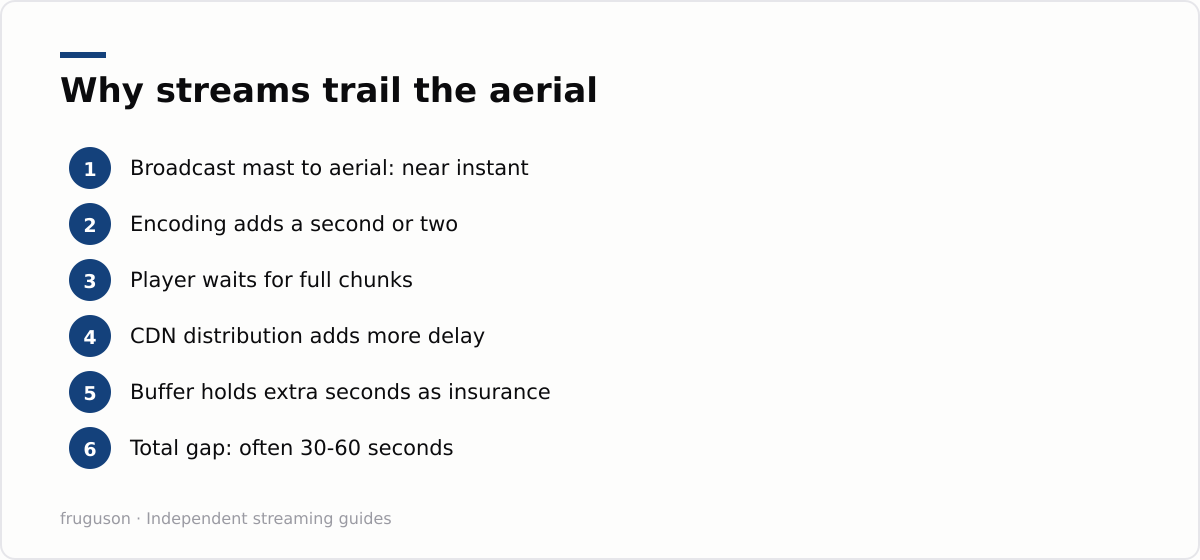
No explanation of how does IPTV work is complete without the delay question. Broadcast television is astonishingly quick. A signal leaves the transmitter mast and reaches every aerial in range at effectively the same instant, so the whole street sees the goal together. Internet delivery cannot match that, and the reasons are baked into everything described above. Encoding takes a moment. The system waits for a full chunk to exist before publishing it. The CDN needs time to distribute that chunk. Your player then deliberately holds several seconds in its buffer as insurance against hiccups.
Stack those delays and a live stream commonly runs somewhere between thirty seconds and a minute behind the aerial, occasionally more on a busy night. This is why football on a streaming service can feel haunted: phones buzz with goal alerts before the ball has visibly crossed the line. Broadcasters are rolling out low latency variants of the main protocols and the gap narrows year by year, but chunking and buffer insurance mean streams will trail the transmitter for a while yet. If the delay genuinely bothers you, an aerial for the big matches remains a perfectly sensible companion to your apps.
What broadband speed do you actually need?
Less than you might fear. Ofcom’s guidance on broadband speeds points to roughly 10 megabits per second for smooth HD streaming and about 25 for 4K, per stream. Most fixed lines sold in the UK today clear those figures with room to spare. The catch hides in the phrase per stream: a household running one 4K film, one HD match and a tablet of cartoons at the same time needs the sum of all three, plus headroom for everything else happening online.
| Picture quality | Rough speed per stream | Comfortable household line |
|---|---|---|
| Standard definition | about 3 Mbps | 10 Mbps and up |
| High definition | about 10 Mbps | 30 Mbps and up |
| 4K Ultra HD | about 25 Mbps | 60 Mbps and up |
Consistency matters more than headline speed. A 40 megabit line that never wavers will stream 4K more happily than a 200 megabit line that collapses every evening at eight. Ofcom’s Media Nations research at https://www.ofcom.org.uk/media-use-and-attitudes/media-habits-adults/medianations charts how far UK viewing has already shifted towards internet delivery, which is exactly why a steady connection now matters as much as a fast one.
IPTV technology is neutral, the sellers often are not
Everything above applies equally to BBC iPlayer and to any other service that streams over your connection. IPTV technology simply means television delivered over internet protocol, and every mainstream UK service is built on it: Freely, ITVX, Channel 4, Sky Stream, Now, Pluto TV and the rest. The word has picked up a grubby second meaning, though. Sellers offering thousands of channels, with every sports package thrown in for pocket money, are almost always restreaming pay TV without any licence. They capture legitimate feeds and re-encode them exactly as described in this guide, then push them through cheap servers with none of the CDN investment behind them. That is why such services collapse the moment a big match kicks off, and why they can vanish overnight with your money.
Put the knowledge to work
Now that the plumbing makes sense, put it to use. Wire the main telly to the router if you possibly can, because every diagnosis gets easier on ethernet. Favour services with proper CDN muscle behind them; our rundown of the best IPTV services in the UK rates exactly how the big names hold up under pressure. If apps need installing or moving between sets, the smart TV setup guide walks through it screen by screen. And the next time your picture softens for ten seconds during a storm, you will know the player is trading sharpness for continuity, which is the whole system working precisely as designed.
Frequently asked questions
Why is my IPTV stream behind live broadcast TV?
Encoding, chunking, CDN distribution and your player's safety buffer each add a few seconds of delay. Stacked together, streams commonly run thirty seconds to a minute behind an aerial. Low latency streaming modes are shrinking that gap, but some delay is built into how chunked delivery works.
What internet speed do I need for IPTV?
Ofcom guidance suggests roughly 10 Mbps for HD and about 25 Mbps for 4K, per simultaneous stream. Most modern UK fixed lines clear that easily. Consistency matters more than raw speed, so a stable mid-range connection often streams better than a fast but flaky one.
Why does my stream lag behind live broadcast?
The chunking and buffering that make internet streams smooth also add delay. Each stream is sliced into short segments, cached on a CDN and reassembled by your player, which typically puts an internet feed 30 to 60 seconds behind an aerial broadcast. It is why a neighbour on Freeview can cheer a goal before it reaches your screen.
Summarize this post with:
Follow How To Watch Streaming on Google News so you never miss a new guide.
Leave a comment