IPTV Equipment Guide UK: What You Actually Need at Home (2026)
The broadband speed, streaming device and network kit you actually need for smooth internet TV in the UK, based on what fixed real buffering in our own homes.
Contents
- Broadband speed for streaming: the real numbers
- The TV: built-in apps or a stick?
- What’s the best streaming device UK buyers can get?
- The network: where buffering actually lives
- Three complete home internet TV setups
- What about the router itself?
- Cables, ports and the corner behind the TV
- How we test this kit
- A note on “future-proofing”
- The bottom line
The streaming industry is very good at selling you things you don’t need: gigabit broadband “for smooth 4K”, £150 streaming boxes, Wi-Fi 7 routers. After years of running internet TV in our own homes, and fixing the buffering complaints of friends and family, here’s the honest list of IPTV equipment UK households actually need, and what each piece really changes.
Everything here applies to licensed UK services (see our full service comparison). However, boxes sold “pre-loaded” with subscription channels are a different story; we cover those in the FAQ.
Broadband speed for streaming: the real numbers
The requirements are much lower than the marketing suggests:
- HD stream: ~5–10 Mbps
- 4K stream: ~25 Mbps
- Two 4K TVs + normal household use: comfortable on a 60–80 Mbps line
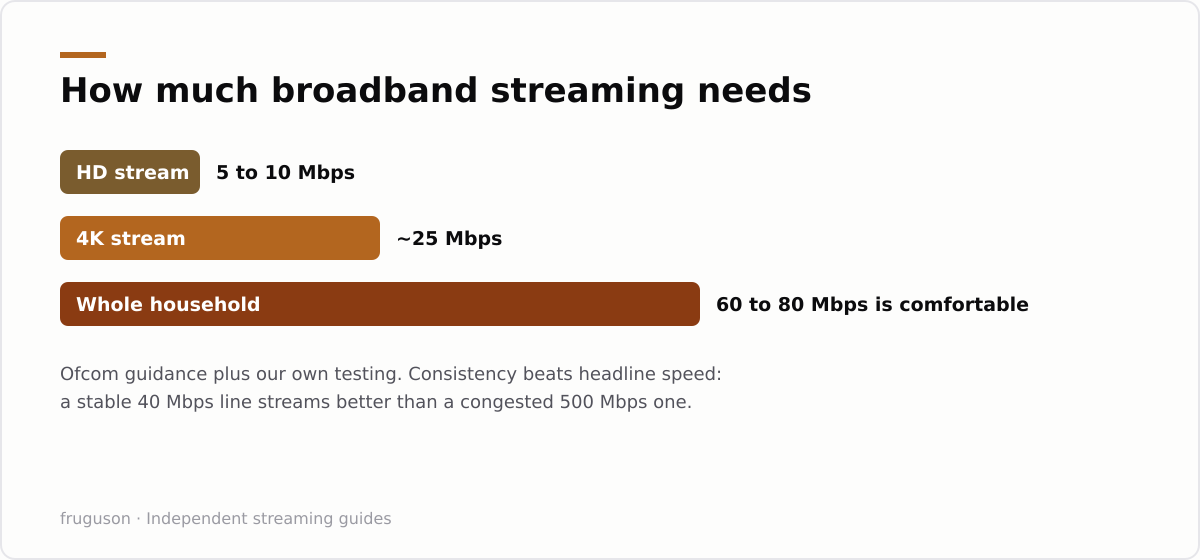
Ofcom’s broadband research tracks what UK lines actually deliver versus advertised speeds, worth checking your provider before upgrading. More importantly, our own testing keeps proving the same point: consistency beats headline speed. A stable 40 Mbps line streams better than a 500 Mbps line with an overloaded Wi-Fi router. Consequently, if your streams buffer at 8pm on a fibre package, upgrading the package almost never fixes it. The broadband speed for streaming that you pay for matters far less than how reliably it reaches the TV.
That said, there is one genuine upgrade case. If you’re on an old ADSL line (sub-20 Mbps), full-fibre is transformative for a multi-TV household.
The TV: built-in apps or a stick?
Our decision rule, after testing both routes:
- TV from ~2020 or newer: use the built-in apps. Samsung, LG and Google TVs all carry the full UK line-up, and many 2024+ sets include Freely for free live channels.
- TV older than ~2019: don’t fight it. Built-in apps get slow and lose support. Instead, a streaming stick upgrades any HDMI TV to the current app ecosystem for £30–60.
Either way, the software side is the easy part, our smart TV setup walkthrough takes about ten minutes.
What’s the best streaming device UK buyers can get?
We’ve run all of these long-term, so here’s the short version:
- Amazon Fire TV Stick (4K); the default choice. Every UK app, frequent sales, fine interface (heavy on ads).
- Chromecast with Google TV / Google TV Streamer, cleaner interface, best universal search, great if you’re in the Google ecosystem.
- Apple TV 4K; the best performance and no interface ads, at 3–4× the price. Worth it if the TV is your main entertainment device.
- Provider boxes (Sky Stream pod, EE TV box), excellent, but they come with the subscription; you don’t buy them separately.
For most households, the best streaming device UK shops sell is simply the Fire TV Stick 4K on sale. Above all, you do not need an expensive “IPTV box” from a marketplace, UK licensed services run on all the mainstream hardware above.
The network: where buffering actually lives
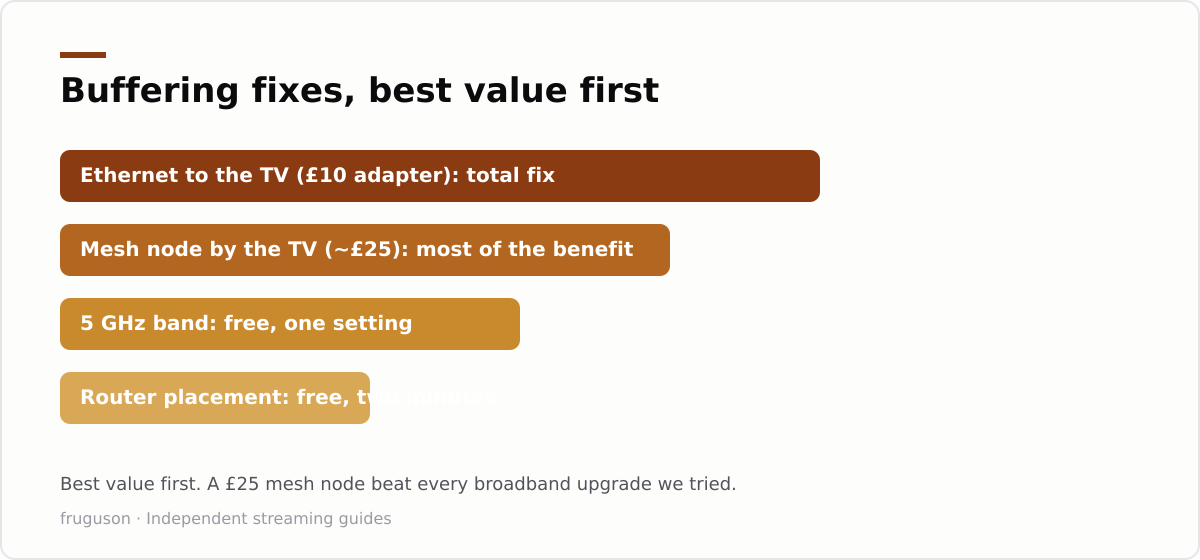
Nearly every “my IPTV keeps buffering” case we’ve investigated ended at the same culprit: the wireless link between router and TV. Therefore, work through these fixes in order of effectiveness:
- Ethernet to the TV or stick, total fix. Flat Cat6 cable runs under carpet; most sticks accept an Ethernet adapter.
- Mesh node in the TV room, 90% of the benefit when cabling is impractical.
- Force the 5 GHz band; the 2.4 GHz band is congested in UK terraces and flats.
- Move the router, off the floor, out of the cupboard, away from the fish tank (really).
In fact, a £25 mesh node fixed more streaming problems in our testing than any broadband upgrade ever did.
Three complete home internet TV setups
To put it all together, here’s what a sensible home internet TV setup looks like at three budgets:
- Budget (£0–35): existing smart TV apps + Freely/ITVX/iPlayer, with a Fire TV Stick if the TV is old. Free TV, one-off cost at most.
- Mainstream (~£10–30/mo): 60 Mbps+ fibre, stick or built-in apps, Now or Sky Stream memberships, mesh node if needed.
- Sports household: as above plus Now Sports + discovery+ (TNT) in season, and Ethernet to the main TV, live sport is where buffering hurts most.
What about the router itself?
The router your ISP shipped is usually fine, and we’d rather you spent nothing here than £200 on a gaming router with antennas like a hedgehog. The genuine upgrade cases are narrow. If your router is more than five or six years old it predates decent band steering, and handing that job to a £25 mesh node helps more than replacing the whole thing. If you’re stuck with an ISP box that can’t split 2.4 and 5 GHz names, a cheap access point in the TV room does the splitting for you.
One honest warning about powerline adapters, since they look like the tidy answer: performance depends entirely on your house wiring. In one of our homes a pair moved a rock-solid 90 Mbps; in another, the same pair managed 11 Mbps and dropped out whenever the kettle ran. Buy from a shop with easy returns and test them the week they arrive.
Cables, ports and the corner behind the TV
Nobody enjoys this paragraph, so here’s the short version. Any HDMI cable sold in the last decade handles 4K streaming; the expensive braided ones buy tidiness, not picture quality. Sticks hide behind the panel, which is convenient until the Wi-Fi signal has to fight through the TV itself, if your stick buffers while a phone next to the TV doesn’t, a short HDMI extender pulling the stick out from behind the metal often cures it. And most sticks accept a wired adapter: a tenner turns the power port into an Ethernet port, which is the single most reliable fix on this page.
How we test this kit
Everything recommended here earned its place in one of our own homes, on ordinary suppliers and ordinary wiring. We run each device for at least a month of family viewing, log every buffering incident with what else the network was doing at the time, and re-test after firmware updates. Nothing on this page is sponsored, and when something we bought turns out to be mediocre, it simply doesn’t get mentioned. The measurements we quote, like the week-one versus week-two buffering counts, come from those logs, not from a lab bench.
A note on “future-proofing”
Sales pages love this word, so let’s be blunt about it. Streaming bitrates have barely moved in five years; a 4K stream still wants roughly 25 Mbps, and the services compress harder every year, not softer. The IPTV equipment UK households buy today will not be obsoleted by bandwidth. What actually ages is app support on TVs, which is exactly why our advice leans toward cheap replaceable sticks over expensive built-in everything. Buy modest, replace rarely, and put the savings toward the subscriptions you’ll actually watch.
The bottom line
Buying IPTV equipment UK wide comes down to three checks: enough broadband (less than you think), a current app platform (built-in or a cheap stick), and a solid link between router and screen (wired if possible). Get those right and every licensed service just works. Once the kit’s in place, our smart TV setup walkthrough covers the software side in about ten minutes.
Frequently asked questions
What broadband speed do I need for IPTV in the UK?
Roughly 10 Mbps per HD stream and 25 Mbps per 4K stream, consistently. A standard 60–80 Mbps fibre package comfortably runs two 4K TVs plus everything else. If streams buffer on a line like that, the problem is your Wi-Fi, not your package.
Do I need a special IPTV box?
No. In the UK, mainstream hardware covers everything licensed: your TV's own apps, a Fire TV Stick or Chromecast with Google TV, or a provider box like Sky Stream's. Dedicated 'IPTV boxes' sold pre-loaded with subscriptions are the classic packaging for unlicensed services, avoid them.
Is Ethernet really better than Wi-Fi for streaming?
For a stationary TV, yes. In our testing a wired connection removed every peak-time buffering incident that Wi-Fi produced on the same line. If cabling isn't practical, a mesh node in the TV room is the next best thing.
Summarize this post with:
Follow How To Watch Streaming on Google News so you never miss a new guide.

Leave a comment