Smart TV Privacy: The Settings Worth Changing Today
Your smart TV logs what you watch through ACR. Here are the privacy settings worth changing today on Samsung, LG, Roku and Fire TV, plus what breaks.
Contents
- Why smart TV privacy matters more than the box led you to believe
- What ACR content recognition actually captures
- Turning off TV tracking settings on the major brands
- The truth about smart TV ads
- What actually breaks when you disable tracking
- Where streaming sticks and cheap IPTV fit in
- The one evening that pays off
Your television watches you back. Most sets sold in the last five years arrive with tracking switched on by default, and the owner rarely meets the menu that governs it. This guide to smart TV privacy covers the settings worth changing today, what each toggle really does, and what stops working once you flip it. None of it needs a factory reset or any technical skill. Everything sits in menus you already own, waiting for someone to look.
This monitoring runs through a feature called automatic content recognition. Your set grabs snapshots of whatever fills the screen, matches them against a huge reference database, then reports what it found. That stream of data feeds targeted advertising and audience measurement. Turning it off is entirely your choice, though manufacturers rarely make the switch easy to find. Most people never realise it exists.
Why smart TV privacy matters more than the box led you to believe
The pitch at purchase was simple: apps, 4K, voice search. The quieter reality is a data pipeline running behind the picture. Ofcom’s Media Nations UK report charts how much British viewing has moved onto connected sets and streaming apps, which is exactly the environment where content recognition thrives. The more you stream, the more there is to log.
Two things make this worth an evening of menu digging. First, the data is granular. It can tie viewing habits to your household and, across the same network, to other devices you own. Second, you already paid for the hardware. Handing over a behavioural profile on top of the purchase price feels a lot like paying twice for one television.
There is also a resale angle few people consider. A profile built over years of viewing follows the account, not the person, so a set passed on or sold second-hand can carry stale data unless it is wiped. Good smart TV privacy hygiene means clearing that stored history before the television ever leaves your house. Doing so is part of the same short menu tour.
What ACR content recognition actually captures
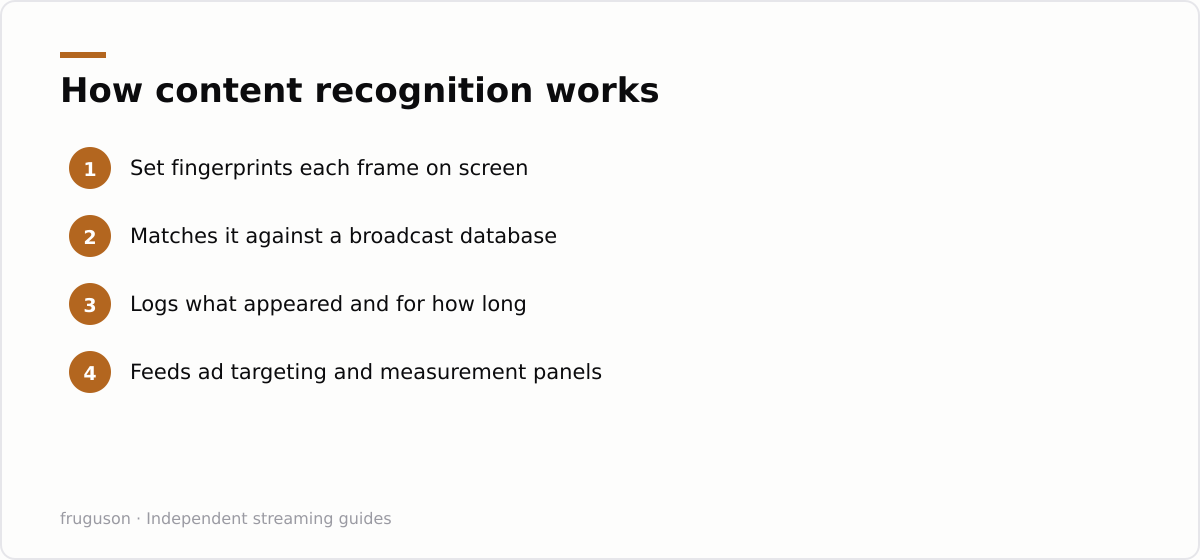
Picture ACR content recognition as Shazam pointed at your screen instead of your speakers. Every few seconds the set fingerprints the current frame and checks it against known broadcasts and adverts. It does not need to know which app you opened. It reads the picture itself, so a DVD, a games console or an aerial channel all get identified the same way.
What the system records is a timeline: what appeared and for how long. That timeline is valuable to advertisers who want to know whether their spot was seen. It also lets a manufacturer package audience insight and sell it onward. The images themselves are not usually kept; the fingerprints and the matches are the product.
None of this breaks the law, and in the UK it falls under data protection rules that require consent. The snag is that consent was often granted inside a rushed setup wizard, buried in a wall of accept buttons you tapped just to reach the home screen. Revisiting that choice is the entire point of the exercise. Nobody reads the wizard, and the makers count on it.
Turning off TV tracking settings on the major brands
The good news: every mainstream brand offers an opt-out. The awkward part: each hides it somewhere different and gives it a deliberately dull name. Below is where the relevant TV tracking settings live on the sets most common in British living rooms. Menu wording shifts between model years, so treat these as the trail rather than the exact map.
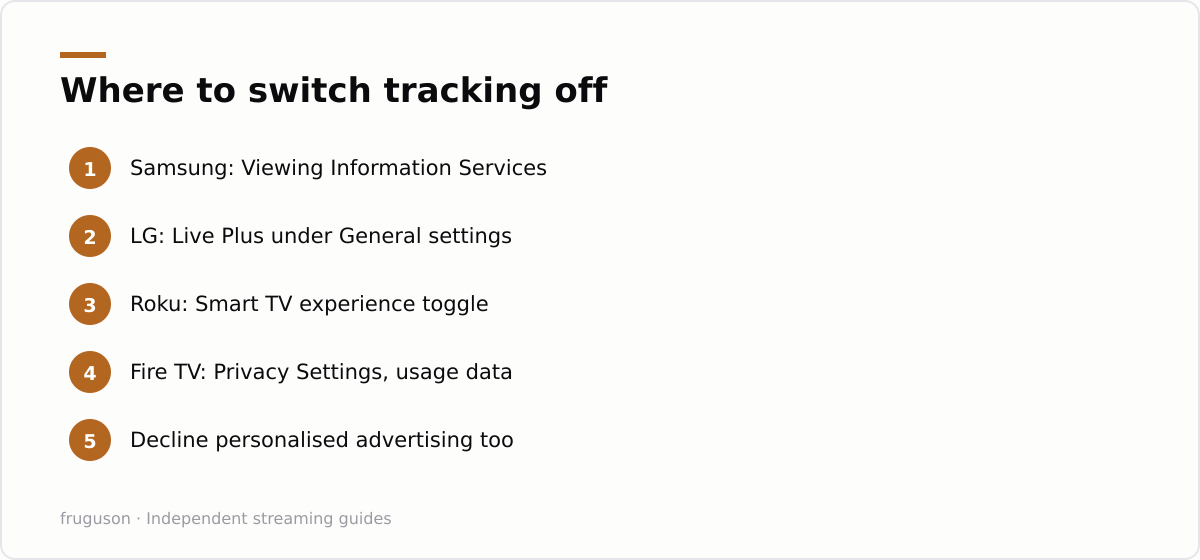
| Brand | Feature name | Where to find it |
|---|---|---|
| Samsung | Viewing Information Services | Settings, then General or Privacy, then Terms and Policies |
| LG | Live Plus | Settings, then All Settings, then General, then Live Plus |
| Sony or Google TV | Samba or ACR consent | Settings, then Privacy, then Ads and content data |
| Roku | Smart TV experience | Settings, then Privacy, then Smart TV experience |
| Amazon Fire TV | Device Usage Data | Settings, then Preferences, then Privacy Settings |
On a Samsung set the toggle you want reads Viewing Information Services, and switching it off stops the sampling at source. If you also run streaming apps or an IPTV player on that hardware, our walkthrough on IPTV on a Samsung smart TV shows where those app permissions sit alongside the privacy menu. LG files the same idea under Live Plus, and the webOS layout changes enough between years that our notes on IPTV on an LG smart TV help if the wording on your set does not match what you expected.
Roku and Fire TV split the decision into several toggles rather than one. You want to decline personalised advertising and opt out of the app or device usage collection. Neither switch stops the set working. Both stop the profiling, and that is the outcome you are after.
The truth about smart TV ads
Turn tracking off and the adverts do not vanish. They simply stop being tailored to you. Smart TV ads sit on the home screen, inside free ad-supported channels like Pluto TV, Samsung TV Plus, LG Channels and The Roku Channel, and in the banner that greets you at power-on. Disabling ACR cuts the link between what you watch and which advert you see, so you get generic promotion in place of targeted promotion.
That distinction lands differently for different people. If a scattershot advert for a car you will never buy bothers you less than a precise one that somehow knows you were pricing cars last week, the opt-out is a clear win. If you barely register either, the privacy gain still holds on its own, because the profiling continues in the background whether or not the advert on screen feels relevant.
What actually breaks when you disable tracking
Very little, and that is the reassuring part. Content recognition is a measurement layer, not a playback engine. Your apps still open. Your channels still tune. Picture quality does not drop by a single pixel.
A few convenience features do lean on the data, and they are the ones worth weighing before you commit. Some sets show “what to watch next” suggestions on the home rail drawn from your viewing history; those grow vaguer once the history stops flowing. Voice search keeps working, though a handful of makers use interaction logs to sharpen it over time. If your television surfaces live sports scores or cast details tied to whatever is playing, that overlay may fall silent, because it drew on the same recognition feed.
For most households the trade is heavily one-sided in the viewer’s favour. You give up a few recommendation nudges. You keep your viewing history to yourself, which was the goal all along. If a recommendation rail does go quiet, the manual search box still finds everything it used to; the set simply stops guessing on your behalf. That is a price most people pay gladly once they see what was being collected in return.
Where streaming sticks and cheap IPTV fit in
Privacy on the panel is only half the job if you plug other kit into it. A separate streaming stick runs its own tracking under its own menus, so an opt-out on the television does not cover a Fire TV Stick or a Google TV dongle sitting in the HDMI port beside it. Each device needs its own pass through the settings. If you are picking hardware with privacy in mind, our IPTV equipment guide for the UK sets out what each type of box collects and how much control it gives back.
One habit does more for your privacy than any single toggle: install apps only from your TV’s own store. Apps that arrive through the official store are reviewed and request the narrowest set of permissions they need, while an app pulled in from outside it can ask for far broader access to the device and your network with nobody checking. Sticking to the built-in store keeps that surface small. The mainstream services people actually use — Freely, BBC iPlayer, ITVX, Channel 4, Channel 5, Sky Stream, Now, discovery+, Prime Video, Netflix — are all there and update themselves automatically, so you rarely have a reason to look elsewhere. If you are choosing what to install, our roundup of the best IPTV services in the UK for 2026 covers the options worth having.
The one evening that pays off
Set aside twenty minutes with the remote and work through the privacy menu on every screen and stick in the house. Flip the recognition toggle, decline personalised advertising, and note which brand called it what so the next model year cannot catch you out. Treat smart TV privacy as a five-minute habit rather than a one-off chore, because a software update can quietly reset a toggle you already turned off. It is a handful of switches the maker left in the on position for their benefit rather than yours. Set them once, check them after any major update, then let the television go back to the single job you bought it for.
Frequently asked questions
Will turning off smart TV privacy tracking stop my apps working?
No. Automatic content recognition is a measurement feature, not a playback engine, so your streaming apps, live channels and picture quality all stay exactly the same. The only things affected are history-based recommendation rails and targeted adverts, which become more generic.
What is ACR content recognition on a television?
ACR content recognition fingerprints the picture on screen every few seconds and matches it against a database of broadcasts and adverts. It works regardless of the source, so an aerial channel, a games console or a DVD all get identified. The resulting timeline feeds ad targeting and audience measurement.
Does turning off tracking on my TV also cover a streaming stick plugged into it?
No. A separate streaming stick, such as a Fire TV Stick or a Google TV dongle, runs its own tracking under its own menus, so an opt-out on the television does not carry across to it. Each device needs its own pass through the privacy settings, and a software update can quietly switch a toggle back on, so it is worth rechecking after any major update.
Summarize this post with:
Follow How To Watch Streaming on Google News so you never miss a new guide.


Leave a comment